

Nov 04
admin
Airport X-Ray Simulator Free Download
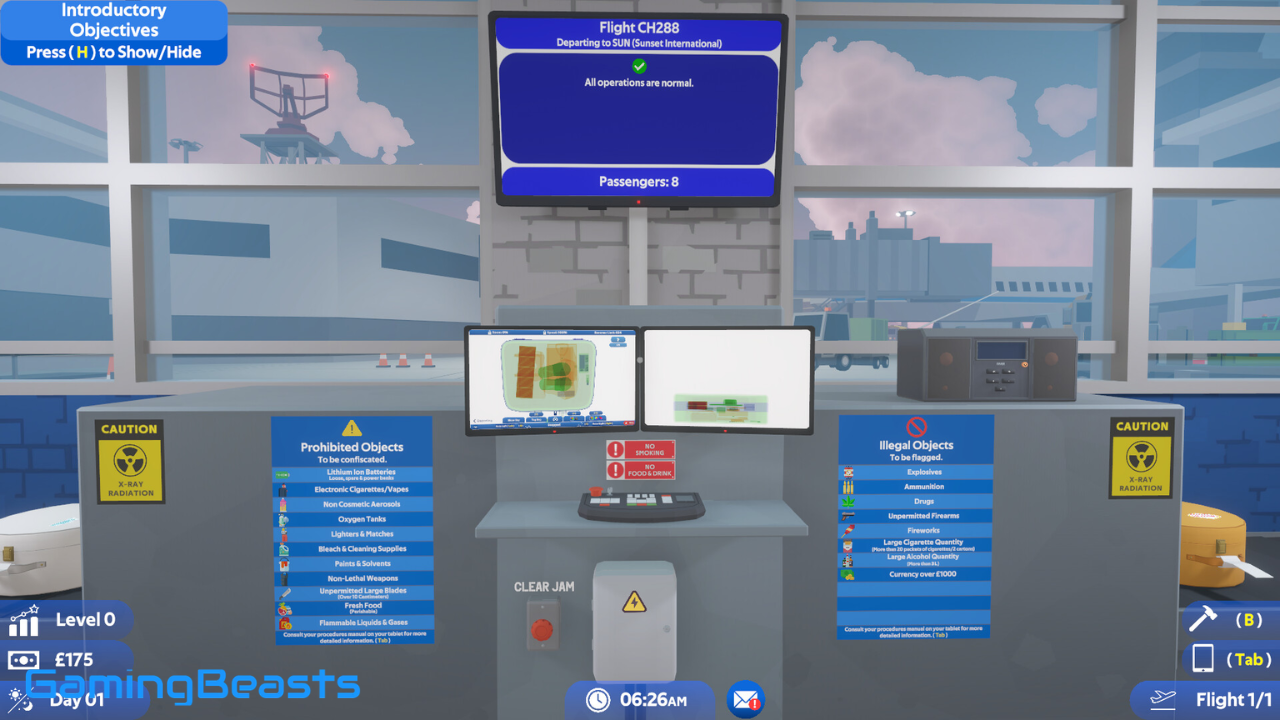
Airport X-Ray Simulator is an airport security simulation game that allows players to experience the responsibilities of a baggage screening officer. Developed by Rainbow Lab, the game puts you in charge of inspecting passenger luggage, operating X-ray scanning equipment, identifying prohibited objects, and keeping airport operations safe.
Unlike traditional airport games that focus on managing flights or building terminals, Airport X-Ray Simulator concentrates on baggage inspection and security procedures. You must carefully examine luggage, recognize suspicious objects, perform manual searches, and make decisions based on the information available.
The game offers an interesting combination of simulation, investigation, management, and hidden-object gameplay. If you enjoy realistic simulation games and challenging inspection tasks, Airport X-Ray Simulator is worth exploring.
Introduction to Airport X-Ray Simulator
Airport X-Ray Simulator is a single-player airport security simulation game developed and published by Rainbow Lab. It was released on December 12, 2024, and is available for Windows PC through Steam.
The game places you in the role of a baggage security operative responsible for checking luggage before it reaches an aircraft. Your main responsibility is to identify dangerous, prohibited, or illegal objects that could create security risks.
The gameplay revolves around inspecting luggage using an X-ray machine. However, scanning is only part of the experience. You may also need to remove suspicious bags from the conveyor, conduct manual inspections, check passenger information, and use additional scanning equipment.
Every inspection requires attention and careful decision-making. Missing a prohibited object or incorrectly handling a suspicious item can affect your daily performance.
Airport X-Ray Simulator is designed for players who enjoy observation-based challenges, realistic work simulations, and investigation games.
Key Features of Airport X-Ray Simulator
Airport X-Ray Simulator includes several interesting features that make its airport security concept engaging. Its gameplay combines baggage scanning, manual inspection, passenger information, and performance management.
Realistic X-Ray Baggage Screening
The main feature of the game is its X-ray baggage screening system. Players must inspect luggage moving along conveyor belts and examine the objects displayed on the scanner.
Different items appear with different shapes and visual characteristics. You must study the scanned image carefully to recognize objects that may violate airport security rules.
The scanning system makes observation an important part of the gameplay. You cannot simply approve every bag without checking its contents.
Manual Baggage Inspection
Sometimes an X-ray image is not enough to identify an object. In these situations, you can remove luggage from the conveyor and perform a manual search.
This feature allows you to interact with objects inside the suitcase and examine suspicious items more closely.
Manual inspections add another layer to the gameplay because players must decide when additional investigation is necessary.
Prohibited Item Detection
Airport X-Ray Simulator challenges players to identify different types of prohibited and illegal objects.
You must recognize suspicious items, understand the applicable security rules, and decide whether an object should be confiscated or reported for further action.
These challenges make the game more interesting because every suitcase can contain a different combination of everyday belongings and restricted objects.
Airport X-Ray Simulator Gameplay
The gameplay focuses on working as an airport baggage security officer. Your job is to inspect incoming luggage and prevent prohibited objects from passing through security.
The experience begins with a tutorial that explains the basic controls, scanning equipment, and inspection procedures. Because the mechanics can be detailed, beginners should take their time learning the different tools.
Operating the X-Ray Scanner
The X-ray scanner is your primary piece of equipment. Luggage arrives on a conveyor belt, and you must examine its contents through the scanning display.
Pay attention to object shapes, positions, and unusual combinations. Your ability to recognize suspicious items becomes increasingly important as you gain experience.
Inspecting Suspicious Luggage
When a bag contains something questionable, you may need to stop it and investigate further.
You can remove the luggage from the conveyor and conduct a manual search to examine its contents.
This makes the gameplay more interactive than a simple scanning simulator.
Checking Passenger Information
Passenger records and permits can provide useful information during inspections.
The in-game computer allows you to access passenger details and other relevant information when handling certain security situations.
Confiscating and Reporting Items
The game requires you to make decisions about suspicious objects.
Depending on the situation, you may need to confiscate prohibited items or flag illegal objects for further action.
Correct decisions contribute to better inspection performance.
Airport Security Screening System
The security screening system is the heart of Airport X-Ray Simulator. It recreates several aspects of baggage inspection and challenges players to recognize objects that may create security concerns.
Understanding X-Ray Scanner Displays
The X-ray display provides a visual representation of objects inside passenger luggage. Players must learn to interpret these images and distinguish ordinary belongings from suspicious items.
Different shapes and overlapping objects can make some bags more difficult to inspect. Careful observation is essential for making accurate decisions.
Recognizing Suspicious Objects
The game includes a variety of everyday objects and potentially dangerous items. You must understand which objects are permitted and which require additional inspection.
Some objects may be difficult to identify through the scanner alone, making manual searches and additional equipment useful.
Handling Security Alerts
When you identify a suspicious object, you must decide how to handle it according to the game’s security procedures.
Confiscating prohibited items and flagging illegal objects are important responsibilities. Incorrect decisions can affect your performance.
Managing Inspection Accuracy
Speed is useful, but accuracy is equally important. Rushing through luggage inspections can result in mistakes, while spending too much time on every bag can reduce your overall efficiency.
The challenge is to develop a balance between careful examination and completing your daily workload.
Game Modes and Mission Challenges
Airport X-Ray Simulator focuses on a daily work simulation rather than traditional action-based game modes.
Players progress by completing baggage inspection tasks and handling increasingly interesting security situations.
Training and Tutorials
New players can learn the basic mechanics through an in-game tutorial. It explains how to use the X-ray scanner, inspect luggage, and interact with the available equipment.
The tutorial is relatively detailed, so beginners should pay attention to the instructions instead of skipping important explanations.
Standard Baggage Inspection
Regular baggage screening forms the main part of the experience. You must inspect luggage arriving on the conveyor belt and identify objects that require attention.
As you become more familiar with the scanning system, you can improve your inspection speed and accuracy.
Manual Search Challenges
Some situations require a closer examination of passenger luggage. Manual searches allow you to investigate individual objects and make better decisions.
Airport X-Ray Simulator System Requirements
Before downloading Airport X-Ray Simulator, check whether your computer meets the required hardware specifications.
The game is designed for Windows PC and uses a 64-bit operating system. Its minimum requirements are relatively accessible, although the recommended specifications provide more room for comfortable performance.
The following requirements are listed on the game’s Steam store page.
Minimum System Requirements
| Component | Minimum Requirement |
|---|---|
| Operating System | Windows 10 |
| Processor | Intel Core i3 |
| RAM | 4 GB |
| Graphics | Dedicated GPU older than 5 years |
| Storage | 2 GB available space |
| Architecture | 64-bit processor and OS |
| Display | Widescreen display suggested |
Recommended System Requirements
| Component | Recommended Requirement |
|---|---|
| Operating System | Windows 10 |
| Processor | Intel Core i5 |
| RAM | 8 GB |
| Graphics | NVIDIA GTX 1060 |
| Storage | 3 GB available space |
| Architecture | 64-bit processor and OS |
| Display | Widescreen display suggested |
Why Download Airport X-Ray Simulator?
Airport X-Ray Simulator offers a different type of gameplay compared with traditional action and adventure titles.
Its main attraction is the opportunity to experience airport baggage screening through an interactive simulation.
The game encourages players to improve their observation skills by examining luggage and identifying unusual objects. It also introduces basic concepts related to baggage inspection, restricted items, and security procedures.
Another interesting aspect is the progression system. Your daily earnings allow you to purchase upgrades, giving you additional goals beyond simply completing inspections.
The combination of X-ray scanning, manual searches, passenger information, and performance reports makes the game suitable for players who enjoy detailed simulation experiences.
It is particularly appealing to fans of investigation games, workplace simulators, and hidden-object challenges.
How to Install Airport X-Ray Simulator
Installing Airport X-Ray Simulator through Steam is straightforward.
Steam Installation
Download the Steam desktop application from the official Steam website and install it on your Windows computer.
After installation, open Steam and sign in to your account. If you are a new user, create an account before continuing.
Downloading the Game
Search for Airport X-Ray Simulator in the Steam store and open its official product page.
Review the game information and complete the purchase process. Once purchased, open your Steam library and locate the game.
Completing Installation
Select Airport X-Ray Simulator and choose the Install option. Steam will download the necessary game files and install them automatically.
Make sure your computer has enough available storage space before starting the download.
Launching the Game
After installation, click Play in your Steam library.
The game will open, and you can begin exploring the airport security environment. Start with the tutorial to understand the scanning system and available inspection tools.
Common Problems and Solutions
Players may occasionally experience technical issues while downloading, installing, or running Airport X-Ray Simulator.
Game Not Launching
If the game does not start, restart Steam and your computer. Check whether your system meets the minimum requirements and install available updates.
Installation Errors
Make sure your internet connection is stable and that your storage drive has enough available space.
If the problem continues, restart Steam and try the installation again.
Low FPS and Performance Issues
Lower the graphics settings, close unnecessary applications, and update your graphics drivers.
A computer with 8 GB of RAM and a GTX 1060 or better is recommended for a more comfortable experience.
Black Screen Problems
Try restarting the game and updating your graphics drivers. You can also check whether your display resolution is compatible with your monitor.
Missing DLL Errors
If Windows reports a missing system component, identify the required runtime and install it from an official Microsoft source.
Corrupted Game Files
Steam provides a file verification feature that can help repair damaged or missing installation files.
Open your Steam library, right-click Airport X-Ray Simulator, select Properties, and navigate to Installed Files. Choose Verify integrity of game files to check the installation.
Frequently Asked Questions (FAQs)
Is Airport X-Ray Simulator free to download?
The complete game is paid and available on Steam. There is no confirmed official free full version. Check the Steam store for current pricing and offers.
Who developed Airport X-Ray Simulator?
Airport X-Ray Simulator was developed and published by Rainbow Lab.
When was Airport X-Ray Simulator released?
The game was released on December 12, 2024.
Can I play Airport X-Ray Simulator on Windows 10?
Yes. Windows 10 is the minimum operating system listed on the official Steam store page.
Does Airport X-Ray Simulator support Windows 11?
The game is listed for Windows PC. Windows 11 is a practical option, although Windows 10 is the explicitly listed minimum requirement.
Can I inspect passenger luggage?
Yes. Inspecting passenger luggage is the main gameplay activity. You can use X-ray scanners and manual searches to examine suspicious objects.
Does Airport X-Ray Simulator have realistic X-ray scanning?
The game features an interactive X-ray screening system that allows players to examine luggage and identify suspicious objects.
Can I upgrade equipment in Airport X-Ray Simulator?
Yes. You can earn money through your daily performance and use it to purchase upgrades.
Can I play Airport X-Ray Simulator offline?
The game is designed as a single-player experience. However, Steam offline-mode requirements apply, so it is best to complete the initial installation and account setup while connected to the internet.
How much storage space does Airport X-Ray Simulator require?
The official minimum storage requirement is 2 GB, while 3 GB is recommended.
Conclusion
Airport X-Ray Simulator is an interesting choice for players who enjoy airport security simulations, investigation challenges, and realistic workplace gameplay. Its combination of X-ray baggage screening, manual inspections, passenger information, and equipment upgrades creates a distinctive gaming experience.
The game stands out because it focuses on the responsibilities of an airport baggage security officer rather than traditional airport management. Every suitcase presents a new inspection task, and players must carefully examine suspicious objects before making decisions.
Although the gameplay may take some time to master, the detailed inspection mechanics and daily progression system provide plenty of reasons to keep playing.

Airport X-ray Simulator Free Download
| Description | Link |
|---|---|
| Direct Download | Download Now |
| Backup Link | Backup Link |
| Fast Download | Fast Download |
| Mirror Download | Mirror Download |
| TORRENT | Torrent Download |