

Oct 03
admin
Operation Octo Free Download 1.6.3
Operation Octo is a colorful aquatic tower-defense game developed and published by Klub Kofta Studio. Released on September 10, 2025, the game combines traditional tower-defense strategy with bullet-dodging survival action. Instead of simply watching your defenses fight, you directly control an octopus scientist and must survive underwater battles while deploying unusual sea-creature turrets.
The story follows Dr. Odin, an octopus scientist, and his dolphin colleague as they attempt to stop hordes of undead skeletons from terrorizing the underwater world. Players travel through different aquatic biomes, unlock new turrets, fight increasingly dangerous enemies, and face challenging boss encounters.
With its cartoon-inspired presentation, humorous setting, strategic gameplay, and action-heavy defense system, Operation Octo offers an unusual take on the tower-defense genre.
Operation Octo Gameplay
The main gameplay loop revolves around defending yourself against waves of underwater skeletons. Players strategically place mechanized sea-creature turrets to create a defensive network and stop enemies from advancing.
However, Operation Octo is more active than a traditional tower-defense game. When your defensive line starts falling apart, you cannot simply sit back and wait. You must move your octopus character around the battlefield, dodge enemy bullets, and survive while your remaining defenses continue fighting.
This combination of tower defense and survival action gives each encounter a faster and more unpredictable feel. Good positioning is important, but movement and reaction speed can become equally important when the battlefield becomes crowded.
Key Features of Operation Octo
1. Aquatic Tower Defense
The core of Operation Octo is its tower-defense system. Instead of conventional military structures, you build your defenses using mechanized versions of sea creatures.
The unusual turret designs give the game its identity and encourage players to experiment with different defensive setups.
2. Unique Sea Creature Turrets
Players can unlock different turrets as they progress. Examples include:
- Pistol Shrimp
- Navy Seal
- Death Ray
- Other mechanized marine creatures
Each turret can play a different role during a battle, so learning where and when to deploy them is an important part of the strategy.
3. Skeleton Enemies
The enemies are primarily undead skeletons that emerge from the ocean and attack your defenses.
As the game progresses, enemy encounters become more demanding, forcing players to improve their turret placement and make better decisions under pressure.
4. Bullet-Dodging Survival
One of the game’s biggest differences from traditional tower defense is direct character control.
When your defensive line is overwhelmed, you must personally dodge incoming attacks and survive. This creates moments where strategic planning turns into fast-paced action.
5. Boss Fights
Operation Octo also features dedicated boss encounters. These battles introduce larger enemies with stronger abilities and require players to combine defensive planning with active movement.
6. Multiple Biomes
The game takes players through different underwater environments rather than placing every battle in the same setting. The current Steam description lists three unique biomes, with additional content planned through free updates.
7. Level Editor and Workshop Content
Operation Octo has expanded beyond its original campaign with a Level Editor and Steam Workshop support. Players can create custom levels and share them with the community.
The developer introduced the Level Editor in a major update, allowing players to create and publish their own scenarios.
This gives the game additional replay value beyond the main campaign.
Graphics and Visual Style
Operation Octo uses a colorful 2D presentation with cartoon-like character designs and underwater environments. The visual style matches the game’s humorous premise, combining cute marine creatures with skeleton enemies and exaggerated weapon designs.
The isometric presentation also makes it easier to understand battlefield positioning and observe where enemies are approaching from.
Operation Octo System Requirements
The game is designed to run on relatively modest PC hardware.
Minimum Requirements
- OS: Windows 7 SP1 or higher
- Processor: SSE2 instruction-set support
- Memory: 8 GB RAM
- Graphics: DirectX 11-compatible dedicated GPU
- DirectX: Version 11
- Storage: 2 GB available space
The Steam listing also notes that the game is built with Unity 2D and provides an option to disable shaders.
macOS Requirements
- OS: macOS Mojave 10.14 or newer
- Processor: Apple Silicon or x64 architecture with SSE2
- Memory: 8 GB RAM
- Graphics: Metal-capable Intel or AMD GPU
- Storage: 2 GB available space
Linux / SteamOS Requirements
- OS: Ubuntu 18.04 or newer
- Processor: SSE2 instruction-set support
- Memory: 8 GB RAM
- Graphics: Dedicated GPU with Vulkan 1.1 support
- Storage: 2 GB available space
For Linux, the developer recommends up-to-date drivers and notes that Vulkan is preferable for compatibility and performance.
Keep in mind that although the game’s listed Windows requirement includes Windows 7, the Steam Client itself requires Windows 10 or later.
How to Download and Install Operation Octo
The safest way to get Operation Octo is through its official Steam listing. The game has an official demo, allowing players to try the experience before purchasing the full version.
Installation Steps
- Install and open Steam on your compatible computer.
- Search for Operation Octo in the Steam store.
- Open the official game page.
- Use the available demo if you want to try the game first.
- For the complete game, purchase it through the official store.
- Select Install from your Steam Library.
- Choose an installation location with sufficient free storage.
- Launch the game after installation completes.
Avoid unofficial cracked versions or suspicious download sites. Besides being unauthorized, such files can contain malware or modified game data.
Beginner Tips for Operation Octo
Plan Your Defense
Do not place turrets randomly. Think about where enemies are most likely to travel and position your defenses so they can cover important areas effectively.
Learn Your Turrets
Experiment with different sea-creature turrets. Understanding what each turret does will help you build a more efficient defensive setup.
Keep Moving
Tower placement is only part of the game. When enemies break through your defenses, use your character’s mobility to dodge incoming attacks and survive.
Watch the Battlefield
Pay attention to enemy movement and incoming projectiles. Reacting early can prevent an otherwise manageable wave from becoming overwhelming.
Prepare for Bosses
Boss encounters require more than simply building as many turrets as possible. Save useful resources and make sure your defensive arrangement can withstand stronger attacks.
Experiment With Custom Levels
After becoming comfortable with the main game, try the community-created content or build your own levels using the Level Editor. This can significantly extend the game’s replay value.
Pros and Cons
Pros
- Creative combination of tower defense and survival action
- Colorful underwater setting
- Unusual sea-creature turrets
- Fun and humorous presentation
- Boss battles
- Multiple aquatic biomes
- Official demo available
- Steam Workshop and Level Editor
- Low storage requirement
- Supports Windows, macOS, and Linux
Cons
- The campaign is relatively short at around 7–9 hours
- Gameplay may become challenging when defenses collapse
- Primarily designed for single-player
- Players looking for a traditional passive tower-defense game may prefer less direct action
Final Verdict
Operation Octo is an inventive tower-defense game that mixes strategic turret placement with direct survival gameplay. Its underwater setting, mechanized sea creatures, skeleton enemies, and humorous presentation make it stand out from more conventional strategy games.
The ability to personally dodge enemy attacks adds another layer to the tower-defense formula, while boss encounters and multiple biomes provide variety throughout the campaign. The addition of a Level Editor and Steam Workshop also gives players more reasons to return after completing the main content.
If you enjoy tower-defense, strategy, survival, colorful indie games, and action-heavy gameplay, Operation Octo is worth checking out. The official demo is also a useful option for players who want to experience its unusual gameplay before purchasing the full version.
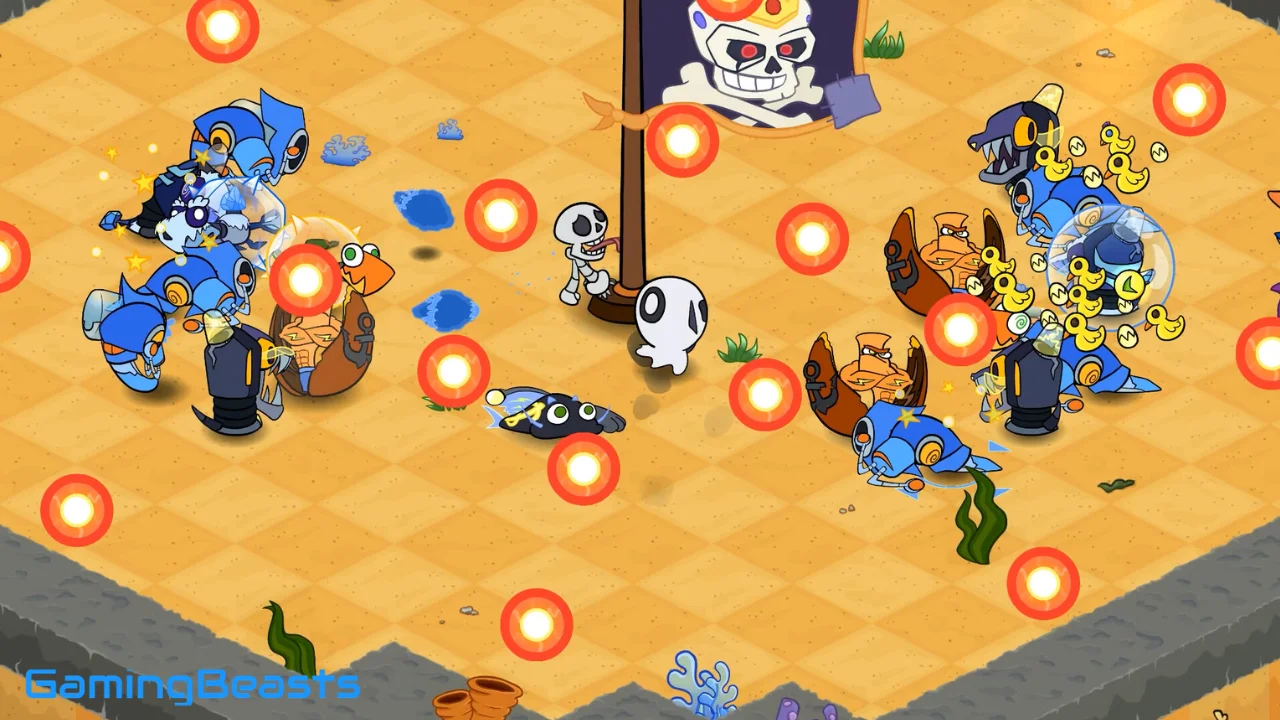

Operation Octo Free Download
Download Now (MEGA)
Direct Download (1FICHIER)
Mirror Download (PIXELDRAIN)
Download Link (MEDIAFIRE)
Direct Download (1FICHIER)
Mirror Download (PIXELDRAIN)
Download Link (MEDIAFIRE)
| Description | Details |
|---|---|
| Title | Operation Octo |
| Size | 954 MB |
| Release Date | 10 Sep, 2025 |