

Oct 03
admin
Office Simulator Free Download Build 23966048
Office Simulator is a casual business and life simulation game developed and published by Tzn Games. The game puts you inside a modern office environment where you begin your career as an intern and gradually work your way up the corporate ladder.
Rather than focusing on a single type of office activity, the game combines everyday workplace tasks with employee management, business development, office customization, time management, and resource management. As your career progresses, you can eventually establish your own company and take responsibility for a growing business.
Office Simulator originally entered Early Access on April 28, 2025, before reaching its full version 1.0 release on December 18, 2025. The full release introduced additional systems, tasks, rewards, software, employees, and quality-of-life improvements.
Office Simulator Gameplay
The main objective is to build a successful career while learning how to manage the different responsibilities of office life.
You start as an intern and complete practical tasks such as attending meetings, handling emails, delivering documents, and getting coffee. Completing work helps you gain experience and progress toward promotions.
As you advance, the gameplay expands beyond individual tasks. You can manage employees, analyze business bids, assign responsibilities, improve your office, and eventually operate your own company. This creates a progression system that moves from personal career development toward broader business management.
The first-person perspective also makes the office feel more interactive. Instead of managing everything from a distant management screen, you can move around the workplace and personally handle various activities.
Employee Management
Once your career develops into business management, employees become an important part of the experience.
You can develop and customize your workforce, distribute tasks, and delegate responsibilities to assistants. Rather than completing every job yourself, you can build a team capable of handling different responsibilities.
Employee happiness also matters. The game encourages you to support your workers by helping with tasks and bringing them coffee when necessary. According to the developer, motivated employees work faster and perform better.
This creates a balance between productivity and workplace management.
Business Bids and Projects
Business expansion involves more strategic decision-making.
You can receive awarded bids and distribute their tasks among employees. The game encourages you to analyze available bids and select profitable projects instead of accepting everything without consideration.
This introduces an economic-management element into the otherwise casual office simulation.
Choosing appropriate projects, assigning responsibilities, and maintaining an effective workforce can help your company grow more efficiently.
Office Customization
Office Simulator allows players to customize and improve their workplace.
You can purchase new furniture and equipment designed to increase productivity and efficiency. As your business grows, you can also expand the workspace by adding new rooms.
Customization options include:
- New furniture
- Office equipment
- Additional rooms
- Different wall colors
- Different flooring
- Workplace improvements
This means the office is not just a background environment. It becomes part of your progression and business strategy.
Managing Energy and Workplace Needs
Your character has to deal with everyday needs while working.
Coffee and timely breaks help maintain your energy. You also need to pay attention to office supplies and electronic equipment.
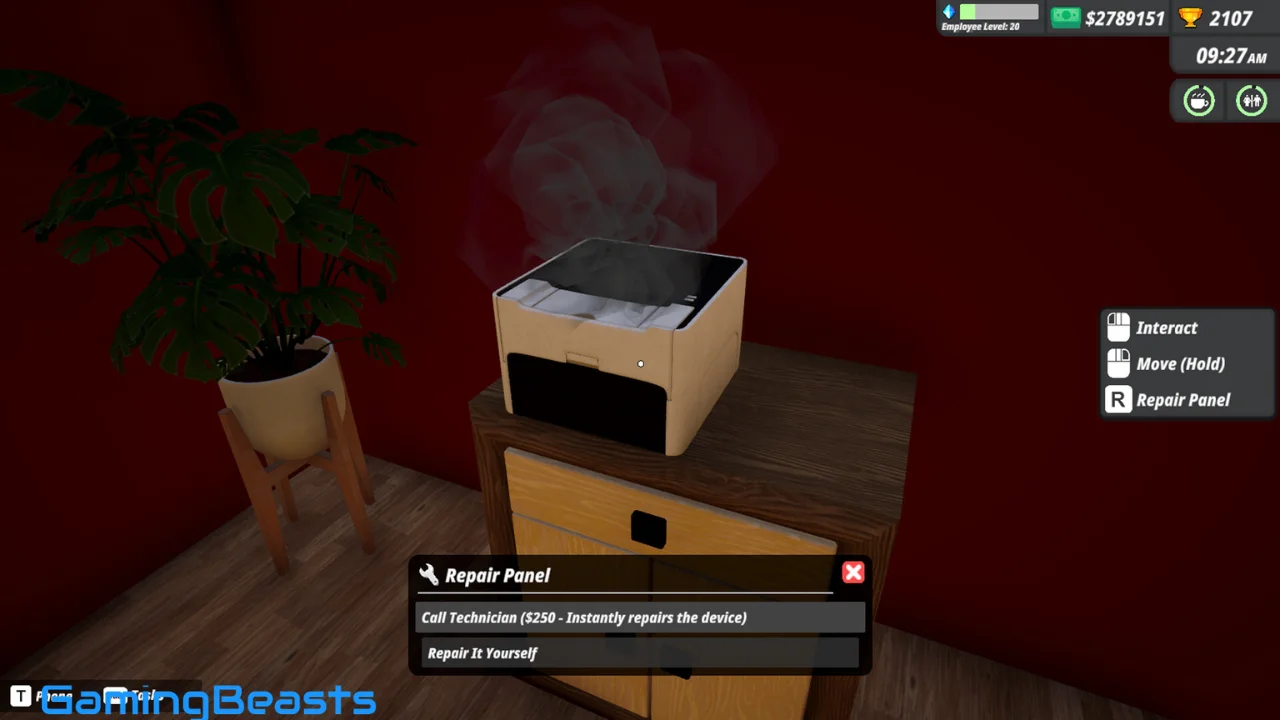
If equipment breaks, it must be repaired. The full-release update added a repair system in which electronic devices can deteriorate through use, allowing players either to repair them themselves or hire professionals.
Ignoring these needs can negatively affect productivity, making resource and time management important parts of the experience.
Software and Productivity Upgrades
The full version introduced a dedicated Software section in the in-game Market.
Players can purchase software designed to improve productivity and simplify certain activities. One example is bid-management software that can automatically sort bids and make it easier to identify profitable opportunities.
The full release also added new items, including the Turbo Coffee Machine, which provides a stronger coffee-related benefit.
These additions give players more ways to optimize their daily workflow.
Graphics and Visual Style
Office Simulator uses a colorful, stylized 3D presentation with a first-person perspective. The office environment is designed around familiar workplace spaces, furniture, equipment, and employees.
The game’s visual approach is relatively lighthearted rather than highly realistic. Steam categorizes it with tags including Colorful, Cute, Stylized, 3D, and First-Person, matching its accessible presentation.
The office can also change visually as you expand and customize it, allowing your workplace to gradually reflect your progress.
Sound and Atmosphere
Sound effects and ambient audio help create the feeling of being inside a functioning office.
The full-release update improved the audio experience with additional ambient sounds and sound effects. It also introduced improvements to environmental lighting to make the workplace atmosphere more polished.
Together with the first-person perspective, these elements help make routine office activities feel more interactive.
Game Modes and Features
Office Simulator is primarily a single-player experience. The Steam version includes Steam Achievements, Steam Cloud, statistics, and Family Sharing. It currently includes 14 Steam Achievements.
The game also supports multiple interface languages, including English, French, Italian, German, Spanish, Simplified Chinese, Portuguese, Japanese, Korean, Russian, Turkish, and Portuguese from Portugal.
Office Simulator System Requirements
Office Simulator is designed for relatively modest gaming PCs compared with demanding modern 3D titles.
Minimum Requirements
- OS: Windows 10 64-bit
- Processor: Intel i5-3550 or AMD Ryzen 5 2500X
- Memory: 4 GB RAM
- Graphics: NVIDIA GTX 1050 or AMD R9 270X
- DirectX: Version 11
- Storage: 5 GB available space
- Architecture: 64-bit processor and operating system
Recommended Requirements
- OS: Windows 10 64-bit
- Processor: Intel i5-7600K or AMD Ryzen 5 2600X
- Memory: 8 GB RAM
- Graphics: NVIDIA GTX 1060 or AMD RX 480
- DirectX: Version 11
- Storage: 5 GB available space
These are the requirements currently listed on Steam.
How to Download and Install Office Simulator
The safest way to get Office Simulator is through its official Steam store page. The current PC release is the full version rather than Early Access, following its December 18, 2025 version 1.0 launch.
Installation Steps
- Install the Steam client on a compatible Windows PC.
- Sign in to your Steam account.
- Search for Office Simulator in the Steam Store.
- Open the official game page.
- Purchase the game through Steam.
- Open your Steam Library.
- Select Office Simulator and choose Install.
- Select your preferred installation location.
- Wait for the installation to finish.
- Launch the game and begin your career.
Avoid unofficial cracked copies or suspicious download websites. Official distribution is safer and ensures that you receive legitimate game files and updates.
Beginner Tips for Office Simulator
Focus on Your Current Responsibilities
When starting out, concentrate on completing your assigned office tasks efficiently. Understanding the basic workflow will make later management systems easier to handle.
Manage Your Energy
Do not ignore coffee and breaks. Keeping your character energized can help maintain productivity during busy periods.
Look After Your Employees
As your company grows, employee performance becomes increasingly important. Help workers when necessary and pay attention to their needs.
Improve the Office Gradually
You do not need to upgrade everything immediately. Prioritize furniture, equipment, and rooms that provide useful productivity benefits.
Analyze Business Bids
When you begin handling company projects, compare bids carefully. Selecting profitable opportunities can make a significant difference to your business growth.
Maintain Your Equipment
Electronic devices can break through use. Repair them when necessary instead of allowing damaged equipment to interfere with productivity.
Use Productivity Software
Once available, software upgrades can reduce repetitive work and help you manage business opportunities more efficiently.
Final Verdict
Office Simulator offers a casual and accessible approach to business simulation by combining everyday office activities with career progression and company management.
Starting as an intern gives the game a straightforward entry point, while promotions gradually introduce more responsibilities. Eventually, players can move from completing personal tasks to managing employees, selecting profitable projects, customizing offices, and building their own company.
The combination of first-person interaction, time management, office customization, employee development, and business strategy gives Office Simulator more depth than a simple workplace-themed game. The full-release additions, including weekly goals, monthly rewards, equipment repairs, software upgrades, new tasks, and additional employees, further expand the management experience.

Office Simulator Free Download
Explore more
For more engaging game reviews and tips, check out our other articles: Hexilibrium, The First Million, Ninja Cat Remewstered.