Oct 14
admin
MEMORIAPOLIS is a historical city-building and management simulation developed and published by 5PM Studio. Released on April 30, 2025, the game challenges players to guide a growing city through five historical ages, from Antiquity to the Industrial Revolution. Along the way, you must manage resources, expand districts, respond to faction demands, and build a lasting urban legacy.
If you’re searching for MEMORIAPOLIS Free Download, this guide explains the game’s gameplay, major features, PC system requirements, beginner strategies, and official installation process. The full game is a paid release, so we’ll also show you where to obtain it safely.
MEMORIAPOLIS Game Overview
MEMORIAPOLIS is a city-building strategy game that focuses on the long-term development of a civilization. Instead of constructing a city that remains in one historical period, players guide their settlement through several eras, unlocking new architecture, monuments, and management challenges as time progresses.
The game stands out because cities grow organically rather than following a strict grid. Buildings and districts develop according to player decisions, creating settlements with different layouts and identities. Players must also balance economic needs, faction relationships, and historical objectives to keep their city progressing.
Key Game Details
| Feature | Details |
|---|---|
| Game title | MEMORIAPOLIS |
| Developer | 5PM Studio |
| Publisher | 5PM Studio |
| Full release date | April 30, 2025 |
| Genre | City Building, Strategy, Simulation |
| Game mode | Single-player |
| Platform | PC via Steam |
| Historical periods | Five ages |
| Graphics | 3D historical city environments |
| Game type | Paid game |
MEMORIAPOLIS is designed for players who enjoy planning, resource management, historical architecture, and strategy. It offers different difficulty levels, making it possible to choose a more relaxed experience or a more demanding city-management challenge.
Core Gameplay and City Management
Organic City Growth
Organic city growth is one of MEMORIAPOLIS’s most distinctive mechanics. Instead of manually arranging every street and block in a fixed pattern, players place buildings and influence the direction of development.
Districts expand over time, creating a city that reflects the choices made throughout the campaign. This makes planning important because early decisions can influence the shape and organization of later development.
Players who enjoy watching a settlement evolve may find this system particularly satisfying. It also distinguishes MEMORIAPOLIS from city builders that rely heavily on rectangular zoning grids.
Resource Management
A growing city needs a reliable supply of resources. Players must balance the demands of construction, population growth, and other management objectives.
Expanding too quickly can put pressure on available supplies and make it harder to meet the city’s requirements. A more measured approach allows you to understand the economy before committing to major construction projects.
Resource management also changes as the city advances through the historical ages. New objectives and buildings create fresh priorities, requiring players to adjust their plans instead of relying on the same strategy throughout the game.
District Planning and Expansion
Districts form the structural foundation of your city. As they develop, they shape the settlement’s appearance and influence how the overall urban environment grows.
Planning ahead is useful, but the organic growth system means players must remain flexible. An approach that works well during Antiquity may require adjustments in later periods.
Rather than focusing only on the number of buildings, consider whether your city has the resources and development capacity needed to support its next stage.
Factions and Political Decisions
MEMORIAPOLIS also includes a faction system that adds a political dimension to city management. Different factions have their own personalities, priorities, and demands.
Some may favor altruistic decisions, while others emphasize military strength or territorial expansion. Players can respond to proposals, negotiate terms, or prioritize certain factions over others.
These decisions can influence the direction of development and the challenges you face. Paying attention to faction demands can help you avoid unnecessary pressure while supporting your broader goals.
The faction system adds variety because the same city-building strategy may produce different results depending on the political circumstances of a particular playthrough.
Main Features of MEMORIAPOLIS
1. Five Historical Eras
The city evolves through Antiquity, the Middle Ages, the Renaissance, the Age of Enlightenment, and the Industrial Revolution.
Each period brings new architecture, monuments, and objectives. This progression provides a long-term goal and makes the city feel like a civilization developing over time.
2. Organic Building and District Development
The game allows districts to expand without forcing every structure into a rigid grid. Building placement and development choices help determine the city’s overall layout.
This system encourages experimentation and makes the appearance of the settlement an important part of the experience.
3. Historical Monuments
Players can construct famous historical landmarks to give their cities a distinctive identity. Examples include the Library of Alexandria, Windsor Castle, the Leaning Tower of Pisa, and the Palace of Versailles.
These structures provide visual variety and connect the city’s growth to its historical setting.
4. Faction Negotiations
Faction personalities create a strategic layer beyond construction and resources. Players must consider competing demands and decide which proposals support their current objectives.
You can engage deeply with faction politics or focus more heavily on the city’s physical development, depending on the situation and your preferred play style.
5. Three Final Wonders
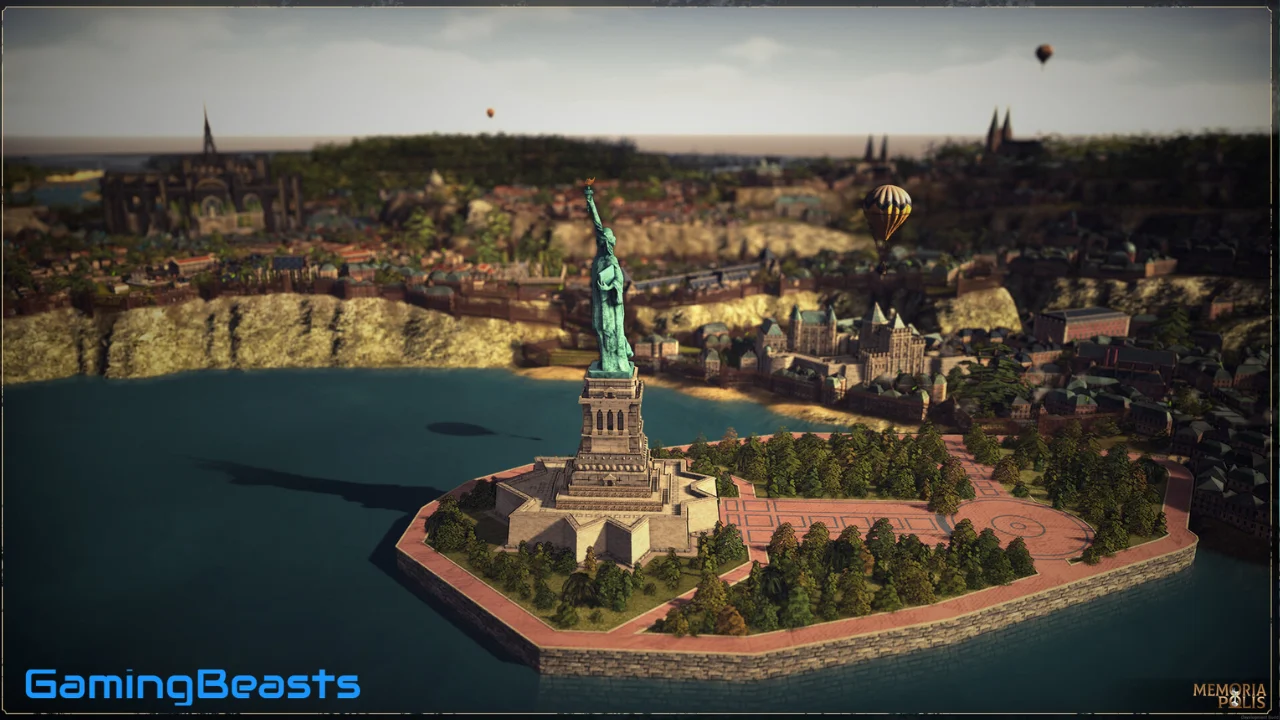
The Industrial Revolution provides a major end goal for your dynasty. Players can work toward constructing one of three final Wonders:
- The Eiffel Tower
- Neuschwanstein Castle
- The Statue of Liberty
Choosing a Wonder gives the campaign a clear destination. Different choices and city developments can encourage players to try alternative approaches in later playthroughs.
6. Difficulty Options
MEMORIAPOLIS includes difficulty settings that adjust objectives, resource balance, and faction pressure.
Players who prefer a less demanding city-building experience can select a more relaxed setting. Those who enjoy strategic challenges can choose a higher difficulty and manage tighter constraints.
7. Replayability
Different maps, faction combinations, difficulty choices, and final Wonder objectives provide reasons to start another city.
Because urban growth is organic, a new campaign can develop into a different-looking settlement even when players use familiar strategies.
MEMORIAPOLIS PC System Requirements
Before downloading the game, make sure your PC meets the published system requirements. MEMORIAPOLIS requires a 64-bit Windows operating system, DirectX 12, and a compatible graphics card.
Minimum System Requirements
| Component | Minimum Requirement |
|---|---|
| Operating system | Windows 10/11 |
| Processor | AMD Ryzen 5 3600X or Intel equivalent |
| RAM | 8 GB |
| Graphics card | NVIDIA GTX 1060 6 GB or AMD equivalent |
| DirectX | Version 12 |
| Storage | 6 GB available space |
Recommended System Requirements
| Component | Recommended Requirement |
|---|---|
| Operating system | Windows 10/11 |
| Processor | AMD Ryzen 5 7600X or Intel equivalent |
| RAM | 8 GB |
| Graphics card | NVIDIA GeForce GTX 2070, as listed on Steam |
| DirectX | Version 12 |
| Storage | 6 GB available space |
These specifications are based on the official Steam listing. The recommended graphics-card entry appears as “GTX 2070” on the listing, so check the current store page if you need clarification before buying.
Meeting the minimum requirements does not guarantee identical performance on every computer. Driver versions, background applications, graphics settings, and city complexity can all affect the experience.
How to Download MEMORIAPOLIS for PC
The full version of MEMORIAPOLIS is available through Steam as a paid game. If you want the legitimate PC release, follow these steps.
Step 1: Visit the Official Steam Store Page
Open the official MEMORIAPOLIS Steam page.
Review the game description, screenshots, system requirements, current price, and user reviews before making a purchase.
Step 2: Sign In to Steam
Launch the Steam client or visit the Steam website. Sign in to your account, or create one if you do not already have an account.
Step 3: Purchase the Game
Purchase MEMORIAPOLIS through the official store if it is available in your region. The price may vary according to your location, currency, and current promotions.
Do not assume that the game is free simply because you searched for “MEMORIAPOLIS Free Download.” Check the official page for any legitimate promotional offer.
Step 4: Download and Install
After purchasing the game, open your Steam Library and select MEMORIAPOLIS.
Choose the installation option and select a drive with enough available space. Allow Steam to download and install the game files before launching it.
Step 5: Start Your City
Once installation is complete, launch the game from your Steam Library. Choose a difficulty setting and begin developing your first settlement.
Take some time to learn the resource systems, building placement, and faction mechanics before expanding too aggressively.
Common Problems and Troubleshooting
The Game Does Not Launch
Check that your PC meets the minimum requirements and that Windows and your graphics drivers are up to date. Restart Steam and your computer before trying again.
Performance Is Poor
Close unnecessary background applications and reduce graphics settings if available. Check whether your processor, graphics card, and memory meet the official specifications.
Because city-building games can involve many active objects and systems, performance may vary as a city becomes more complex.
Installation Fails
Confirm that your internet connection is stable and that the installation drive has at least 6 GB of free space. Additional free space is useful for temporary files and general system operation.
Game Files Are Missing or Corrupted
Open the game’s properties in your Steam Library and use Steam’s installed-file verification feature. This can identify and replace damaged or missing files.
Problems Continue After Troubleshooting
Check official announcements and Steam community discussions for known issues and available fixes. If necessary, contact the developer through its official support resources.
Frequently Asked Questions (FAQs)
1. What is MEMORIAPOLIS?
MEMORIAPOLIS is a historical city-building and strategy simulation in which players develop a city through five eras, manage resources, interact with factions, and work toward constructing a final Wonder.
2. Can you download MEMORIAPOLIS on PC?
Yes. The PC version is available through Steam. Visit the official store page to review the game and purchase it.
3. Is MEMORIAPOLIS free to download?
The full game is a paid release. Check the official Steam store page for the current price and any legitimate promotional offers.
4. Where can I download MEMORIAPOLIS officially?
You can obtain the game from the official Steam store page.
5. How many historical ages are in MEMORIAPOLIS?
The game features five historical ages: Antiquity, the Middle Ages, the Renaissance, the Age of Enlightenment, and the Industrial Revolution.
6. What are the minimum PC system requirements?
The official listing specifies Windows 10/11, an AMD Ryzen 5 3600X or Intel equivalent, 8 GB RAM, an NVIDIA GTX 1060 6 GB or AMD equivalent, DirectX 12, and 6 GB of available storage.
7. How much storage space does MEMORIAPOLIS require?
The official Steam listing specifies 6 GB of available storage.
8. Can you build historical monuments in MEMORIAPOLIS?
Yes. Players can construct historical landmarks, including the Library of Alexandria, Windsor Castle, the Leaning Tower of Pisa, and the Palace of Versailles.
9. What Wonders can you build in the Industrial Revolution?
The three final Wonders are the Eiffel Tower, Neuschwanstein Castle, and the Statue of Liberty.
10. Is MEMORIAPOLIS suitable for beginners?
It can be. The game offers different difficulty levels, allowing newcomers to choose a more relaxed experience while learning the building, resource, and faction systems.
Conclusion
MEMORIAPOLIS combines historical city building, organic urban growth, resource management, and faction diplomacy into a strategy experience that develops across five ages. From establishing a settlement in Antiquity to pursuing a final Wonder during the Industrial Revolution, every stage presents new opportunities and management challenges.
Before downloading, check your PC against the official system requirements and confirm the current price. The full game is paid, and the safest way to obtain it is through Steam.
For players who enjoy historical settings, thoughtful planning, and watching a civilization evolve, MEMORIAPOLIS Download for PC is worth exploring through its official store page.