Oct 18
admin
Librarian: Tidy Up the Arcane Library Download v1.0.13
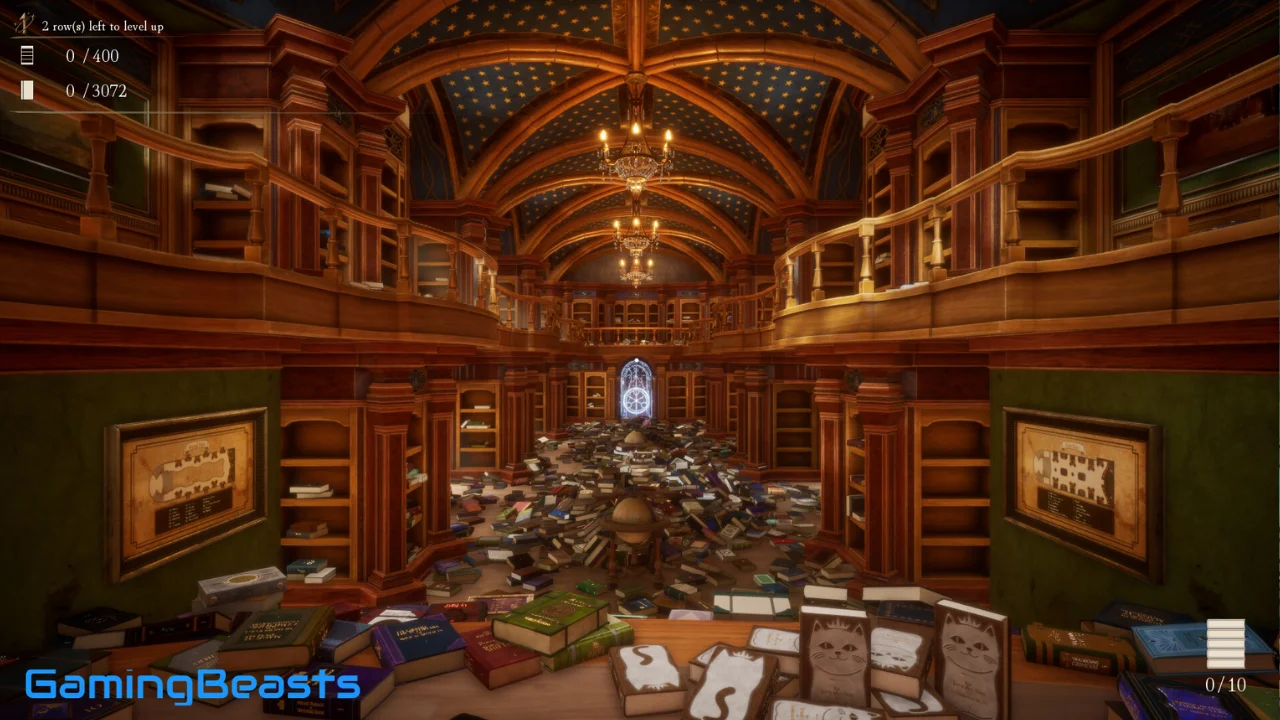
Librarian: Tidy Up the Arcane Library is a first-person organization simulation that transforms the simple task of arranging books into a magical and satisfying gaming experience. Developed and published by ArtRising, the game takes place inside a mysterious library where thousands of scattered books must be returned to their proper shelves.
The story begins after a mischievous fairy leaves the once-majestic library in complete disorder. With the principal demanding that every book be returned to its rightful place, your job is to restore order to the enormous collection. What sounds like a straightforward task becomes a strategic challenge as you identify books, organize shelves, and unlock magical abilities that help you work more efficiently.
Released on April 30, 2026, Librarian: Tidy Up the Arcane Library! combines casual simulation, collection-based progression, and fantasy-inspired atmosphere. Instead of focusing on combat or complicated missions, it rewards observation, planning, and the satisfaction of watching a messy environment become organized.
In this guide, you will discover the game’s main features, gameplay mechanics, magical abilities, PC system requirements, beginner tips, and how to download Librarian: Tidy Up the Arcane Library for PC.
What Is Librarian: Tidy Up the Arcane Library?
Librarian: Tidy Up the Arcane Library! is a single-player simulation game built around sorting and shelving books. You explore a large magical library from a first-person perspective and work through the challenge of returning 3,072 books to their correct locations.
Each book needs to be identified and placed according to the library’s organization rules. Titles and cover designs provide clues about where individual volumes belong, so players must pay attention to details rather than placing books randomly.
The game introduces a satisfying cycle of discovery, organization, and progression. As you complete bookshelf rows correctly, you can unlock magical abilities that improve your efficiency. These powers make the experience more strategic because choosing when and how to use them can significantly affect your workflow.
Librarian: Tidy Up the Arcane Library Gameplay
Organize Thousands of Books
The central gameplay challenge involves sorting a collection of 3,072 books. Each volume belongs in a particular section, and players use its title, cover, and series information to determine the correct location.
At first, the library can appear overwhelming because books are scattered throughout the environment. However, breaking the task into smaller sections makes it easier to manage. You can focus on identifying similar books, completing individual rows, and gradually clearing the surrounding mess.
Correct placement matters because the principal evaluates your progress based on how many rows are properly shelved. Accuracy and speed both play a role in achieving a strong result.
Identify Books by Their Titles and Covers
Book identification is an important part of the experience. Different titles and cover designs help distinguish the library’s many categories, which include subjects such as destructive magic, travel to other worlds, and romance novels.
Rather than treating every book as an identical object, you must examine the available clues and determine where each volume belongs. This makes observation an essential skill.
As you become familiar with the categories and series, recognizing the correct books becomes easier. Learning the library’s organizational patterns can help you work faster without sacrificing accuracy.
Complete Shelves and Unlock Progression
Finishing bookshelf rows is more than a visual achievement. Correctly completed rows contribute to your evaluation and help unlock magical abilities.
These abilities improve your efficiency and introduce additional strategy to the organizing process. You must decide which powers are most useful for your current situation and how to combine them to reduce unnecessary work.
The progression system gives you a reason to continue beyond the initial satisfaction of placing books. Each completed section brings you closer to restoring the entire library.
Magical Abilities in Librarian: Tidy Up the Arcane Library
Magical abilities are an important part of the gameplay because they help reduce the time and effort required to organize the enormous collection.
Assemble
Assemble summons other books from the same series directly into your hands. This ability can be useful when you are working with related volumes and want to gather them without searching for every book individually.
Insight
Insight highlights other books belonging to the same series. It helps you identify matching volumes within a disorganized pile, reducing the time spent searching through similar-looking books.
Auto-Shelving
Auto-Shelving places the books in your hands onto their correct shelves in the proper order. This ability helps simplify the placement process and can make it easier to maintain an efficient workflow.
The best approach is to use each ability when it solves a specific problem. For example, Insight can help locate matching volumes, Assemble can gather related books, and Auto-Shelving can speed up the final placement.
Librarian: Tidy Up the Arcane Library PC System Requirements
Before downloading the game, check whether your computer meets the published hardware requirements.
| Component | Minimum Requirements | Recommended Requirements |
|---|---|---|
| Operating System | 64-bit Windows 10 | 64-bit Windows 11 |
| Processor | Intel Core i7-4790K / AMD Ryzen 5 1500X | Intel Core i7-8700 / AMD Ryzen 5 3600 |
| Memory | 8 GB RAM | 16 GB RAM |
| Graphics | NVIDIA GTX 980 Ti 6GB / AMD RX 6500 XT | NVIDIA GTX 1080 / AMD RX 5700 XT |
| DirectX | Version 12 | Version 12 |
| Storage | 2 GB available space | 2 GB available space |
The game requires a 64-bit processor and operating system. Although its storage requirement is small, the listed processor and graphics requirements are worth checking before installation.
People Also Ask About Librarian: Tidy Up the Arcane Library
Is Librarian: Tidy Up the Arcane Library available on PC?
Yes. Librarian: Tidy Up the Arcane Library! is available on PC through Steam. You can visit its official store page to review the current price and installation details.
Is Librarian: Tidy Up the Arcane Library free to play?
No. It is a paid game. Check the official Steam page for the current price in your region and any available discounts.
How many books are in Librarian: Tidy Up the Arcane Library?
The game challenges players to return 3,072 books to their correct places throughout the magical library.
What type of game is Librarian: Tidy Up the Arcane Library?
It is a first-person organization simulation with casual, indie, and fantasy elements. Its main activities involve identifying books, completing shelves, and using magical abilities to improve efficiency.
Can you unlock magical abilities in the game?
Yes. Completing bookshelf rows helps unlock abilities such as Assemble, Insight, and Auto-Shelving, which support different parts of the organizing process.
Does Librarian: Tidy Up the Arcane Library support multiplayer?
The game is listed as a single-player experience. Its core gameplay is designed around organizing the library and improving your own progress.
What are the minimum PC requirements?
The minimum specifications include 64-bit Windows 10, an Intel Core i7-4790K or AMD Ryzen 5 1500X processor, 8 GB RAM, a GTX 980 Ti 6GB or RX 6500 XT graphics card, DirectX 12, and 2 GB of available storage.
Final Thoughts
Librarian: Tidy Up the Arcane Library! turns book organization into a magical first-person simulation filled with clear objectives, strategic abilities, and satisfying visual progress. Its challenge of shelving 3,072 books gives players a substantial task, while tools such as Assemble, Insight, and Auto-Shelving help make the process more efficient.
With its fantasy setting, dynamic audio, and focus on thoughtful organization, the game is a good option for players who enjoy casual simulations and relaxing but purposeful gameplay.
If you are ready to restore order to the arcane library, visit the official Steam page to check the latest price and download options.