

Oct 10
admin
Goblins of Elderstone Free Download for PC 22578705
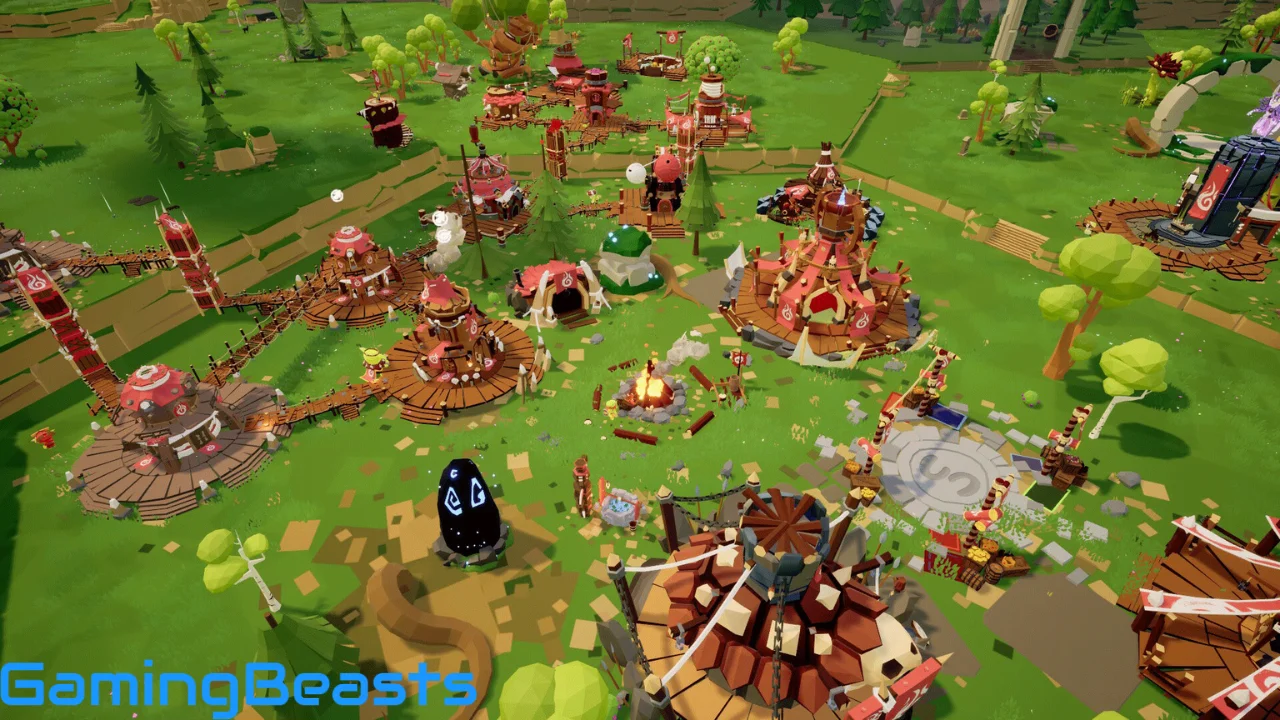
Goblins of Elderstone is a fantasy city-building and tribe-management game that puts you in charge of a growing goblin settlement. Developed by Outerdawn and Lost Goblin and published by Outerdawn, the game combines resource management, village construction, survival mechanics, exploration, and strategic decision-making. Instead of controlling a traditional human kingdom, you must guide a tribe of unpredictable goblins through the challenges of everyday life in a dangerous fantasy world.
Building a successful settlement requires more than placing houses and collecting materials. You must provide food, manage resources, assign suitable jobs, protect your goblins from enemies, and prepare for harsh seasonal conditions. Every decision can influence the future of your village, making careful planning an important part of the experience.
What Is Goblins of Elderstone?
Goblins of Elderstone is a single-player fantasy simulation and strategy game focused on building and managing a goblin tribe. Your objective is to transform a small settlement into a thriving village while keeping its inhabitants alive and productive.
The game gives players responsibility for construction, resource production, work assignments, defense, and the general needs of the tribe. Goblins have their own personalities and behaviors, so managing them can be unpredictable. Keeping everyone satisfied and ensuring that essential tasks are completed requires constant attention.
The fantasy setting also introduces dangerous creatures, difficult choices, and supernatural elements. Players can explore the surrounding world, organize raids to collect valuable loot, and interact with systems involving the gods. These features give the game more depth than a basic village-building simulator.
Goblins of Elderstone Gameplay Overview
Building and Expanding Your Goblin Settlement
Village construction is one of the main activities in Goblins of Elderstone. You begin with a small tribe and gradually develop the settlement by placing buildings, organizing production, and expanding the available living space.
Different structures serve different purposes. Some support housing, while others contribute to resource production, storage, or other essential village activities. Choosing where to build and how to organize your settlement can influence how efficiently your goblins work.
As the tribe grows, you must think beyond simply adding more buildings. Your settlement needs a reliable supply of materials and enough production capacity to support its population. Poor planning can create bottlenecks that prevent the village from developing smoothly.
The freedom to develop your village gives you room to experiment with different layouts. You can gradually shape the settlement according to your priorities while adapting to the needs of a growing goblin population.
Resource Gathering and Management
Resources are essential to almost every aspect of village development. Construction, production, survival, and expansion all depend on having the right materials available when they are needed.
You must organize your settlement so that important resources continue to arrive without creating unnecessary shortages. Gathering materials is only part of the challenge; storing them and making sure they reach the correct buildings are equally important.
A shortage of a basic resource can affect several systems at once. Construction may slow down, production can become less efficient, and the tribe may struggle to maintain its usual activities. For this reason, it is important to monitor supplies rather than waiting until a problem becomes serious.
Successful resource management involves planning ahead, prioritizing essential needs, and making sure that your goblins are assigned to useful tasks. As the village expands, a well-organized production system becomes increasingly important.
Goblin Needs and Tribe Management
The goblins themselves are at the center of the gameplay. They are not simply numbers in a population counter; their behavior and individual traits can affect how your settlement operates.
You need to make sure that your tribe has access to essential supplies and that important work continues. Assigning goblins to suitable jobs helps the village remain productive, while neglecting their needs can create additional difficulties.
Managing a growing population can become complicated because different responsibilities compete for your attention. You might need more workers for resource gathering, additional support for construction, or better protection when enemies approach.
The game’s humorous goblin theme adds personality to these management challenges. Your job is to guide the tribe toward a stable future, even when its inhabitants do not always behave as expected.
Survival, Threats, and Defense
Life in Elderstone is not entirely peaceful. Hostile creatures and other dangers can threaten your village, making defensive planning an important part of settlement management.
You need to prepare for dangerous encounters rather than concentrating exclusively on construction and production. Depending on the situation, you may need to assign guards, protect vulnerable areas, or use other available defensive options to keep the tribe safe.
Exploration and Raids
Exploration gives you opportunities to look beyond the boundaries of your village. Goblins of Elderstone features a raid system that allows you to send goblins out to collect loot from the surrounding world.
Raids connect exploration with the survival of your settlement. Valuable loot can help support village development, but you must also consider the needs of the goblins who remain at home. Sending workers away without planning can leave important tasks unattended.
The system encourages you to balance immediate opportunities against the longer-term needs of your tribe. Before organizing a raid, consider whether your village has enough workers to maintain production and whether its current situation allows you to take that risk.
These expeditions add variety to the management experience and give players another way to develop their settlement beyond gathering resources locally.
Key Features of Goblins of Elderstone
Flexible Village Construction
Goblins of Elderstone allows you to develop your settlement according to your own plans. You can expand the village gradually, position buildings, and organize its layout around the needs of your tribe.
Construction decisions affect more than appearance. A practical layout helps you manage production and expansion while keeping essential village activities organized.
Individual Goblin Traits and Jobs
The goblins have individual traits that can influence their suitability for different tasks. Assigning the right goblins to the right jobs is an important part of maintaining an efficient settlement.
You must consider the tribe’s changing needs when deciding how to distribute available workers. A good balance between production, construction, and other responsibilities helps keep the village running.
Resource Production and Crafting
Resource management is a major part of the game. You must collect materials, maintain production, and ensure that essential supplies are available for construction and survival.
The production system encourages players to think ahead. Expanding too quickly without supporting the settlement’s resource needs can create problems that become harder to solve as the population increases.
Gods and Faith-Related Systems
The fantasy setting includes gods and supernatural elements that add another layer to the management experience. These systems give you additional considerations when making decisions about the tribe’s development and survival.
Learning how the faith-related mechanics work can help you make better use of the game’s available options. They also contribute to the distinctive fantasy identity of Goblins of Elderstone.
Seasonal Survival Challenges
Seasonal conditions can influence how you manage your village. Preparing for winter and maintaining sufficient supplies are important parts of long-term survival.
Players who ignore preparation may find themselves dealing with several problems at once. Planning ahead helps reduce pressure on production and gives the tribe a better chance of surviving difficult periods.
Raids, Loot, and Difficult Decisions
Raids allow you to send goblins into the surrounding world in search of loot. Meanwhile, the game’s narrative events and choices can influence your progress and create situations where you must weigh different outcomes.
These systems make each decision more meaningful. You must decide when to expand, when to conserve resources, and when the potential rewards of an expedition justify the risks.
Goblins of Elderstone System Requirements for PC
Before installing Goblins of Elderstone, check whether your computer meets the listed PC requirements. The following specifications are based on the game’s current Steam listing and should be checked again before publication or purchase.
| Component | Minimum Requirements | Recommended Requirements |
|---|---|---|
| Operating System | Windows 10, version 2004 or 20H2 | Windows 11, version 24H2 |
| Processor | Intel Core i5-6600K or AMD Ryzen 5 1500X, quad-core | Quad-core Intel or AMD, 2.5 GHz or faster |
| Memory | 16 GB RAM | 32 GB RAM |
| Graphics | NVIDIA GeForce RTX 2060 or better, as listed | NVIDIA GeForce RTX 3080 |
| DirectX | Version 12 | Version 12 |
| Storage | 400 MB available space | 400 MB available space |
These are the specifications displayed in the store listing, not a guarantee of performance on every computer. Actual performance may depend on your hardware, drivers, operating system, and the state of the game.
Pay particular attention to the listed memory and graphics requirements. If your computer is below the minimum specifications, check the latest official information before purchasing, as meeting some requirements does not guarantee smooth gameplay.
Final Thoughts
Goblins of Elderstone offers a fantasy settlement-management experience built around the unpredictable nature of goblins. From constructing a village and managing resources to organizing raids and preparing for winter, the game challenges you to keep your tribe alive while developing a settlement that can withstand difficult conditions.
Its combination of city building, population management, survival mechanics, and fantasy elements makes it worth considering for fans of strategy and colony simulators. Players who enjoy planning production systems and responding to unexpected problems may find plenty to explore.
Before downloading, review the official system requirements and decide whether to purchase the full game or try the demo first. For a safe installation, use the official Steam store page and check its current information before proceeding.

Goblins of Elderstone Free Download
| Description | Links |
|---|---|
| Goblins of Elderstone Build 22578705 | Download Link 1 |
| Goblins of Elderstone.zip (MEGA) | Download Link 2 |
| Goblins of Elderstone.zip (1FICHIER) | Download Link 3 |
| Goblins of Elderstone.zip (PIXELDRAIN) | Download Link 4 |
| Goblins of Elderstone.zip (MEDIAFIRE) | Download Link 5 |
| Goblins of Elderstone.zip (GOFILE) | Download Link 6 |
| Goblins of Elderstone.zip (RANOZ) | Download Link 7 |
| Goblins of Elderstone.zip (BOWFILE) | Download Link 8 |
| Goblins of Elderstone.zip (BUZZHEAVIER) | Download Link 9 |
| Goblins of Elderstone.zip (FREEDLINK) | Download Link 10 |
| Goblins of Elderstone.zip (MIXDROP) | Download Link 11 |
| Goblins of Elderstone.zip (CHOMIKUJ) | Download Link 12 |